

Usage limits and the Grace period play an important role when downgrading to the Orta Basic plan. Before a downgrade can be completed, your workspace must meet the Basic plan’s usage requirements. This article explains the supported limits, how to resolve exceeded limits, and how the grace period helps you make the necessary adjustments.
Usage Limits
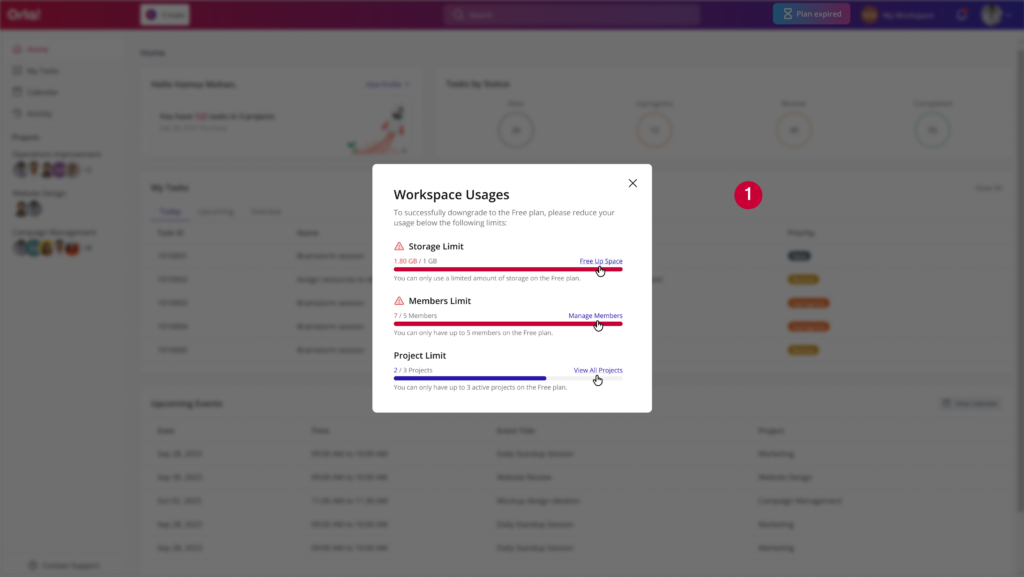
To downgrade to the Orta Basic plan, your workspace usage must be within the limits supported by the plan. If any of the following limits are exceeded, the downgrade cannot be completed until the usage is reduced.
- Up to 3 projects
- Up to 5 users
- Up to 1 GB storage
If your workspace exceeds any of these limits, a “Usage Limit Exceeded” message will be displayed.
How to Resolve It:
- Review your workspace usage and identify any limits that have been exceeded.
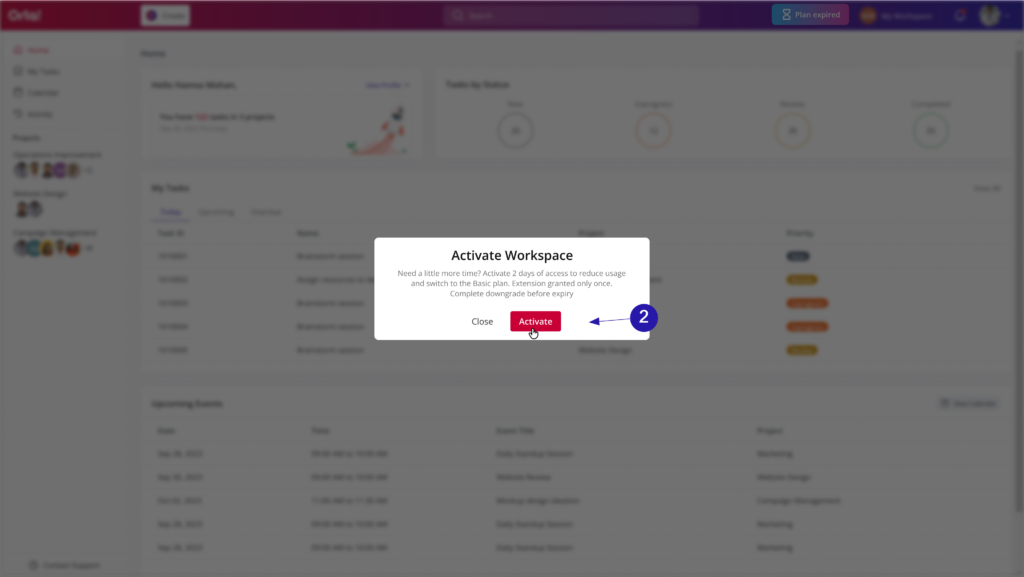
- In the next step activate your workspace to begin making changes to your projects, users, or storage.
- Then:
- Remove projects until the total is within the allowed limit.
- Reduce the number of active users to 5 or fewer.
- Free up storage to stay within the 1 GB limit.
Once your workspace meets all Orta Basic plan requirements, initiate the downgrade again.
Grace Period
When your Free Trial or Orta Pro subscription ends, the workspace is automatically deactivated. To make any required adjustments to projects, users, or storage, you will need to activate the workspace again.
Activating the workspace starts a 2-day grace period, giving you temporary access to:
- Review your workspace usage.
- Bring projects, users, and storage within Basic plan limit.
- Complete the downgrade process.
If the downgrade is completed during the grace period, your workspace will continue seamlessly on the Basic plan.
If the downgrade is not completed within the 2-day grace period, the workspace will become inactive again. To continue with the downgrade, contact Support for assistance in reactivating the workspace.
By understanding the Orta Basic plan’s usage limits and grace period, you can prepare your workspace for a successful downgrade. Ensure your projects, users, and storage remain within the supported limits, and complete any required adjustments during the grace period to avoid interruptions to workspace access.