

The Chat sidebar is where you’ll find all your conversations in one place. It’s designed to help you quickly locate chats, start new ones, and keep track of what’s happening across your channels and messages.
At the top, you’ll see a few helpful tools:
- Search – Looking for a channel or message? Type and find it fast.
- Filter – Want to see only unread/DM/channel conversations? Use this.
- Create (+) – Start a new direct message or create a new channel.
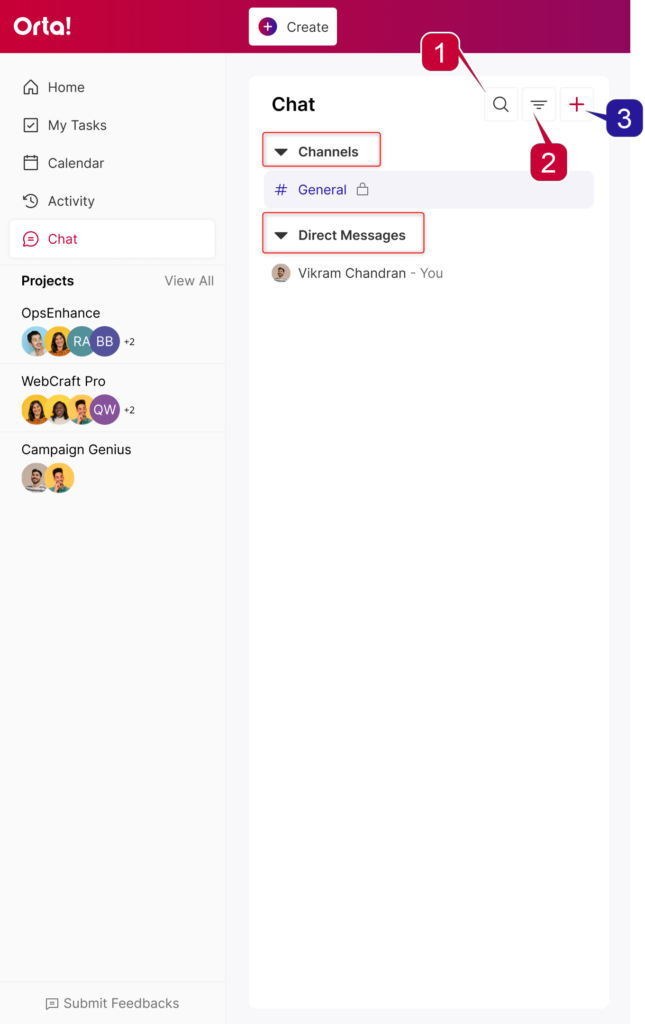
Below that, your conversations are organized into two groups:
- Channels – Group conversations shared with multiple team members.
- Direct Messages – Private conversations between you and another member.
This way, the sidebar keeps your conversations organized and easy to access, so you can jump into the right discussion without wasting time searching for it.